|
|
|
|
| Overview | News | Articles | How to.. | Samples | Videos | Order | Free Trial | Demo |  | PR | PAD |
|
|
|
| | 1. How to use ReadDataInBytes method? | | 2. Is it possible to convert into .FLAC files with Alvas.Audio? | | 3. Is it possible to convert mp3 or wav stereo files into mono files (to reduce file size) with Alvas.Audio? | | 4. Is there a way to join 2 mp3 files into a single one using Alvas.Audio? | | 5. Do you have an example of converting aif to mp3 in C#? | | 6. How to move Ogg file to Wav file with Ogg Vorbis data in C#? | | 7. How to convert any media file to wav in C#? | | 8. How to convert audio file to Ogg Vorbis file? | | 9. How to convert a uncompressed wave file in PCM format to a wav file compressed in GSM 6.10 Audio Codec? | | 10. How to convert media file to WMA file? | | 11. Do you have an example on how to play a song 2 seconds before the actual playing song in VB.Net? | | 12. I need to create a web application than can convert any audio file entered into a specific format (.wav 8khz mono 16bit PCM maximum file size 65kB). Can Alvas.Audio do this? Is it able to set the maximum file size? | | 13. I want to convert MP3 files to WAV (PCM) files on a Window 2008 Server. Is that possible with you library without enabling the Windows feature 'Desktop Experience'? | | 14. DsReader does not work in 64-bit mode. | | 15. How to play a WAV file inside of a console application in c#? | | 16. How to convert multiple audio files at a time in C#.
Would that be the best way to handle multi-threading? | | 17. Is there a way to force use a specific audio codec? | | 18. How to convert from one audio format to another? | | 19. Console and multithreaded recording and playback | | 20. Vox audio file format | | 21. Removes DC offset. | | 22. Converts Mp3 Joint Stereo to mono. | | 23. Resampling and noise. | | 24. Audio Readers. | | 25. Audio and File formats. | | 26. Asp.Net Audio Converter | | 27. Alvas.Audio and WPF. | | 28. How to save audio to mp3 on Silverlight 4. | | 29. ID3 tags for Wave files. | | 30. What is ACM driver? | | 31. How can be one audio file mixed to another? | | 32. What is compressed audio format? | | 33. What is a PCM format? | | 34. What is a Wav-file? |
| 1. How to use ReadDataInBytes method?
            string fileName = "test.wav";
            IAudioReader ir = new WaveReader(File.OpenRead(fileName));
            IntPtr format = ir.ReadFormat();
            const int miliseconds = 500;
            int skipBytes = 0;
            // Converts from milliseconds to bytes for current stream.
            int readBytes = ir.Milliseconds2Bytes(miliseconds);
            while (true)
            {
                // Reads audio data starts at skipBytes position and readBytes length.
                byte[] data = ir.ReadDataInBytes(skipBytes, readBytes);
                if (data.Length == 0)
                {
                    break;
                }
                skipBytes += readBytes;
            }
            ir.Close();// Closes the current reader and the underlying stream.
Up
| 2. Is it possible to convert into .FLAC files with Alvas.Audio?
    string inFile = @"c:\work\flac\1.wav";
    Sox.Convert(@"C:\Program Files (x86)\sox-14-4-2\sox.exe", inFile, inFile + ".flac");
N.B. You need install Sox
Up
| 3. Is it possible to convert mp3 or wav stereo files into mono files (to reduce file size) with Alvas.Audio?
        Mp3ToMono(@"d:\down\stereo.mp3");
        WavToMono(@"d:\down\stereo.wav");

        static void Mp3ToMono(string fileName)
        {
            DsReader dr = new DsReader(fileName);
            IntPtr formatPcm = dr.ReadFormat();
            byte[] dataPcm = dr.ReadData();
            dr.Close();
            WaveFormat wfPcm = AudioCompressionManager.GetWaveFormat(formatPcm);
            IntPtr formatPcmMono = AudioCompressionManager.GetPcmFormat(1, wfPcm.wBitsPerSample, wfPcm.nSamplesPerSec);
            var dataPcmMono = AudioCompressionManager.Resample(formatPcm, dataPcm, formatPcmMono);
            var formatMp3Mono = AudioCompressionManager.GetCompatibleFormat(formatPcmMono, AudioCompressionManager.MpegLayer3FormatTag);
            var dataMp3Mono = AudioCompressionManager.Convert(formatPcmMono, formatMp3Mono, dataPcmMono, false);
            using (Mp3Writer mw = new Mp3Writer(File.Create(fileName + ".mp3")))
            {
                mw.WriteData(dataMp3Mono);
            }
        }
        static void WavToMono(string fileName)
        {
            DsReader dr = new DsReader(fileName);
            IntPtr formatPcm = dr.ReadFormat();
            byte[] dataPcm = dr.ReadData();
            dr.Close();
            WaveFormat wfPcm = AudioCompressionManager.GetWaveFormat(formatPcm);
            IntPtr formatPcmMono = AudioCompressionManager.GetPcmFormat(1, wfPcm.wBitsPerSample, wfPcm.nSamplesPerSec);
            var dataPcmMono = AudioCompressionManager.Resample(formatPcm, dataPcm, formatPcmMono);
            using (WaveWriter mw = new WaveWriter(File.Create(fileName + ".wav"), AudioCompressionManager.FormatBytes(formatPcmMono)))
            {
                mw.WriteData(dataPcmMono);
            }
        }
Up
| 4. Is there a way to join 2 mp3 files into a single one using Alvas.Audio?
        JoinMp3("out.mp3", "in1.mp3","in2.mp3");

        static void JoinMp3(string outFile, params string[] inFiles)
        {
            Mp3Writer mw = new Mp3Writer(File.Create(outFile));
            foreach (string inFile in inFiles)
            {
                Mp3Reader mr = new Mp3Reader(File.OpenRead(inFile));
                mw.WriteData(mr.ReadData());
                mr.Close();
            }
            mw.Close();
        }
Requires Alvas.Audio Trial
Up
| 5. Do you have an example of converting aif to mp3 in C#?
	string fileName = @"e:\down\sample.aif";
	AiffReader ar = new AiffReader(File.OpenRead(fileName));
	IntPtr format = ar.ReadFormat();
	byte[] data = ar.ReadData();
	byte[] dataMp3 = AudioCompressionManager.Wave2Mp3(format, data);
	ar.Close();
	var mw = new Mp3Writer(File.Create(fileName + ".mp3"));
	mw.WriteData(dataMp3);
	mw.Close();
Requires Alvas.Audio Trial
Up
| 6. How to move Ogg file to Wav file with Ogg Vorbis data in C#?
Download and install Ogg Vorbis ACM Codec
        static void OggToWavWithOgg()
        {
            string fileName = @"e:\Down\fortuna.ogg";
            using (DsReader dr = new DsReader(fileName))
            {
                if (dr.HasAudio)
                {
                    short oggFormatTag = 26479;
                    IntPtr format = dr.ReadFormat();
                    WaveFormat waveFormat = AudioCompressionManager.GetWaveFormat(format);
                    IntPtr formatOgg = AudioCompressionManager.GetCompatibleFormat(format, oggFormatTag);
                    using (WaveWriter ww = new WaveWriter(File.Create(fileName + ".wav"),
                        AudioCompressionManager.FormatBytes(formatOgg)))
                    {
                        AudioCompressionManager.Convert(dr, ww, true);
                    }
                }
            }
        }
Requires Alvas.Audio Trial
Up
| 7. How to convert any media file to wav in C#?
        static void ToWav()
        {
            string fileName = @"e:\down\male.ogg";
            using (DsReader dr = new DsReader(fileName))
            {
                if (dr.HasAudio)
                {
                    IntPtr format = dr.ReadFormat();
                    using (WaveWriter ww = new WaveWriter(File.Create(fileName + ".wav"),
                        AudioCompressionManager.FormatBytes(format)))
                    {
                        byte[] data = dr.ReadData();
                        ww.WriteData(data);
                    }
                }
            }
        }
Requires Alvas.Audio Trial
Up
| 8. How to convert audio file to Ogg Vorbis file?
    string fileName = @"e:\Down\male.wav";
    Sox.Convert(@"c:\Program Files (x86)\sox-14-4-1\sox.exe", fileName, fileName + ".ogg");
Requires Alvas.Audio Trial
Up
| 9. How to convert a uncompressed wave file in PCM format to a wav file compressed in GSM 6.10 Audio Codec?
        static void ToWavWithGsm()
        {
            string fileName = @"e:\Down\male.wav";
            WaveReader wr = new WaveReader(File.OpenRead(fileName));
            IntPtr format = wr.ReadFormat();
            IntPtr formatGsm = AudioCompressionManager.GetCompatibleFormat(format,
                AudioCompressionManager.Gsm610FormatTag);
            byte[] dataGsm = AudioCompressionManager.ToFormat(wr, formatGsm);
            WaveWriter ww = new WaveWriter(File.Create(fileName + ".wav"),
                AudioCompressionManager.FormatBytes(formatGsm));
            ww.WriteData(dataGsm);
            ww.Close();
            wr.Close();
        }
Requires Alvas.Audio Trial
Up
| 10. How to convert media file to WMA file?
    string fileName = @"e:\Down\test.wmv";
    DsConvert.ToWma(fileName, fileName + ".wma", DsConvert.WmaProfile.Stereo128);
Requires Alvas.Audio Trial
Up
| 11. Do you have an example on how to play a song 2 seconds before the actual playing song in VB.Net?
    Private plex As PlayerEx = New PlayerEx()

    Sub Play2Seconds(ByVal fileName As String)
        Dim dr As DsReader = New DsReader(fileName)
        Dim format As IntPtr = dr.ReadFormat()
        Dim data As Byte() = dr.ReadData(0, 2)
        dr.Close()
        plex.OpenPlayer(format)
        plex.AddData(data)
        plex.StartPlay()
    End Sub
Requires Alvas.Audio Trial
Up
| 12. I need to create a web application than can convert any audio file entered into a specific format (.wav 8khz mono 16bit PCM maximum file size 65kB). Can Alvas.Audio do this? Is it able to set the maximum file size?
        static void ToPcm8khzMono16bit65kB(string fileName)
        {
            const int maxSize = 65*1024 - 44/*Wav specific size*/;
            DsReader dr = new DsReader(fileName);
            //PCM 8khz mono 16bit
            IntPtr format = AudioCompressionManager.GetPcmFormat(1, 16, 8000);
            byte[] data = AudioCompressionManager.ToFormat(dr, format);
            dr.Close();
            //Cut the audio file to max size
            if (data.Length > maxSize)
            {
                WaveFormat wf = AudioCompressionManager.GetWaveFormat(format);
                int align = wf.nBlockAlign;
                int size = maxSize / align * align;
                byte[] data2 = new byte[size];
                Buffer.BlockCopy(data, 0, data2, 0, size);
                data = data2;
            }
            WaveWriter ww = new WaveWriter(File.Create(fileName + ".wav"),
                AudioCompressionManager.FormatBytes(format));
            ww.WriteData(data);
            ww.Close();
        }
Requires Alvas.Audio Trial
Up
| 13. I want to convert MP3 files to WAV (PCM) files on a Window 2008 Server. Is that possible with you library without enabling the Windows feature 'Desktop Experience'?
1) Please download and install X Codec Pack
2) Use code below
static void AnyToWav(string fileName)
{
    DsReader dr1 = new DsReader(fileName);
    if (dr1.HasAudio)
    {
        WaveWriter ww = new WaveWriter(File.Create(fileName + ".wav"),
           AudioCompressionManager.FormatBytes(dr1.ReadFormat()));
        ww.WriteData(dr1.ReadData());
        ww.Close();
        Console.WriteLine("Done!");
    }
    else
    {
        Console.WriteLine("Has no audio");
    }
}
Important: change the settings of the project to
Project\Properties\Build\Platform Target: x86
If you see "Done!" conversion was successfully and see xxx.mp3.wav result file.
Requires Alvas.Audio Trial
Up
| 14. DsReader does not work in 64-bit mode.
To solve this problem you need to change the settings of the project
Project\Properties\Build\Platform Target: x86
If the project is hosted in IIS (Internet Information Services) you need to set up a pool for your Web application
Control Panel\Administrative Tools\Internet Information Services (IIS) Manager\.
    .\Application Pools\{your pool}\Advanced Settings..\Enable 32-Bit Applications: True
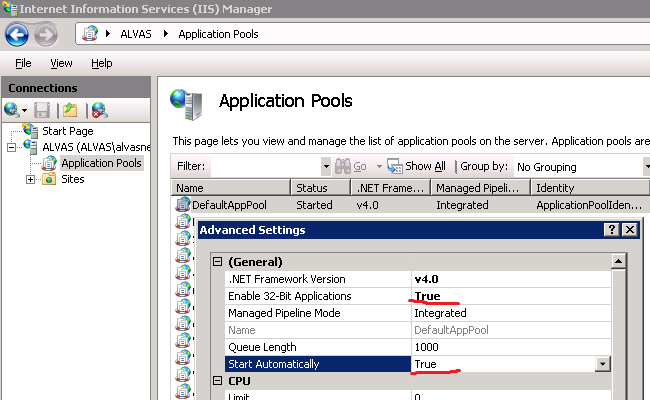
For IIS 7.x you need also set up
Start Automatically: True
Requires Alvas.Audio Trial
Up
| 15. How to play a WAV file inside of a console application in c#?
    class Program
    {
        static PlayerEx pl = new PlayerEx(true);

        static void ConsolePlayer(string fileName)
        {
            pl.Done += new PlayerEx.DoneEventHandler(pl_Done);
            WaveReader wr = new WaveReader(File.OpenRead(fileName));
            pl.OpenPlayer(wr.ReadFormat());
            pl.AddData(wr.ReadData());
            pl.StartPlay();
            System.Threading.Thread.CurrentThread.Join();
        }

        static void pl_Done(object sender, DoneEventArgs e)
        {
            if (e.IsEndPlaying)
            {
                System.Threading.Thread.CurrentThread.Abort();
            }
        }

        static void Main()
        {
            ConsolePlayer(@"e:\Down\1\1.wav");
        }
    }
Requires Alvas.Audio Trial
Up
| 16. How to convert multiple audio files at a time in C#.
Would that be the best way to handle multi-threading?
        // Multiple encoding Wav PCM -> Mp3
        private static void MultipleWav2Mp3()
        {
            var path = "e:\\Down\\wav\\";
            var files = new List() { "notify.wav", "tada.wav", "chimes.wav" };
            Parallel.ForEach(files, file =>
            {
                AudioCompressionManager.Wave2Mp3(path + file, path + file + ".mp3");
            });
        }

        // Multiple decoding any audio file -> Wav PCM
        private static void MultipleAny2Pcm()
        {
            var path = "e:\\Down\\wav\\";
            var files = new List() { "1.wma", "2.m4a", "3.aif" };
            Parallel.ForEach(files, file =>
            {
                using (var dr = new DsReader(path + file))
                {
                    using (var ww = new WaveWriter(File.Create(path + file + ".wav"),
                        AudioCompressionManager.FormatBytes(dr.ReadFormat())))
                    {
                        ww.WriteData(dr.ReadData());
                    }
                }
            });
        }
Requires .Net framework 4.0 and Alvas.Audio Trial
Up
| 17. Is there a way to force use a specific audio codec?
The code below shows driver(codec) details for each compatible format. You can use the driver details to select the specified driver.
static void CompatibleFormatListByDriver()
{
string mp3File = "tada.mp3";
Mp3Reader mr = new Mp3Reader(File.OpenRead(mp3File));
IntPtr format = mr.ReadFormat();
FormatDetails[] fdList = AudioCompressionManager.GetCompatibleFormatList(format, true);
foreach (FormatDetails fd in fdList)
{
Console.WriteLine("Fromat: {0}", fd.ToString());
int driver = fd.Driver;
DriverDetails dd = AudioCompressionManager.GetDriverDetails(driver);
Console.WriteLine("Copyright: {0}", dd.Copyright);
Console.WriteLine("DriverVersion: {0}", dd.DriverVersion);
Console.WriteLine("Features: {0}", dd.Features);
Console.WriteLine("Licensing: {0}", dd.Licensing);
Console.WriteLine("LongName: {0}", dd.LongName);
Console.WriteLine("ShortName: {0}", dd.ShortName);
}
mr.Close();
}
Requires Alvas.Audio Trial
Up
| 18. How to convert from one audio format to another?
To convert from one audio format to another, we can use the GetCompatibleFormat. See example below.
static void CompatibleFormat()
{
string mp3File = "tada.mp3";
Mp3Reader mr = new Mp3Reader(File.OpenRead(mp3File));
IntPtr format = mr.ReadFormat();
IntPtr newFormat = AudioCompressionManager.GetCompatibleFormat(format,
AudioCompressionManager.PcmFormatTag);
WaveWriter ww = new WaveWriter(File.Create(mp3File + ".wav"),
AudioCompressionManager.FormatBytes(newFormat));
AudioCompressionManager.Convert(mr, ww, false);
ww.Close();
mr.Close();
}
To convert all compatible formats we can use GetCompatibleFormatList. Try code below.
static void CompatibleFormatList()
{
string mp3File = "tada.mp3";
Mp3Reader mr = new Mp3Reader(File.OpenRead(mp3File));
IntPtr format = mr.ReadFormat();
FormatDetails[] fdList = AudioCompressionManager.GetCompatibleFormatList(format, true);
foreach (FormatDetails fd in fdList)
{
IntPtr newFormat = fd.FormatHandle;
WaveWriter ww = new WaveWriter(File.Create(String.Format("{0}.{1}.{2}",
mp3File, fd.ToString(), ".wav")),
AudioCompressionManager.FormatBytes(newFormat));
AudioCompressionManager.Convert(mr, ww, false);
ww.Close();
}
mr.Close();
}
Requires Alvas.Audio Trial
Up
| 19. Console and multithreaded recording and playback
Question: How to use RecorderEx and PlayerEx in console application or Windows Service?
Answer: In order to use RecorderEx and PlayerEx in a console application or Windows Service need to create instances of these classes by using a parameterized constructor:
new RecorderEx(true) and
new PlayerEx(true), respectively. The same is true for multi-threaded recorder and player.
Below is an example of full duplex Recorder and Player.
using System;
using Alvas.Audio;
namespace AudioConsCs
{
class Program
{
static void Main(string[] args)
{
rex.Data += new RecorderEx.DataEventHandler(rex_Data);
rex.Open += new EventHandler(rex_Open);
rex.Close += new EventHandler(rex_Close);
rex.Format = pcmFormat;
rex.StartRecord();
Console.WriteLine("Please press enter to exit!");
Console.ReadLine();
rex.StopRecord();
}
static RecorderEx rex = new RecorderEx(true);
static PlayerEx play = new PlayerEx(true);
static IntPtr pcmFormat = AudioCompressionManager.GetPcmFormat(1, 16, 44100);
static void rex_Open(object sender, EventArgs e)
{
play.OpenPlayer(pcmFormat);
play.StartPlay();
}
static void rex_Close(object sender, EventArgs e)
{
play.ClosePlayer();
}
static void rex_Data(object sender, DataEventArgs e)
{
byte[] data = e.Data;
play.AddData(data);
}
}
}
Below is an example of multithreaded full duplex Recorder and Player in Windows Service.
/*
* rem run cmd as administrator
* rem install service
* \\Windows\Microsoft.NET\Framework\v2.0.50727\installutil AudioWindowsServiceCs.exe
* rem uninstall service
* \\Windows\Microsoft.NET\Framework\v2.0.50727\installutil AudioWindowsServiceCs.exe /u
*/
using System;
using System.ServiceProcess;
using System.Threading;
using Alvas.Audio;
namespace AudioWindowsServiceCs
{
public partial class AudioService : ServiceBase
{
public AudioService()
{
InitializeComponent();
}
protected override void OnStart(string[] args)
{
Thread t = new Thread(Start);
t.Start();
}
protected override void OnStop()
{
rex.StopRecord();
}
static void Start()
{
rex.Data += new RecorderEx.DataEventHandler(rex_Data);
rex.Open += new EventHandler(rex_Open);
rex.Close += new EventHandler(rex_Close);
rex.Format = pcmFormat;
rex.StartRecord();
}
static RecorderEx rex = new RecorderEx(true);
static PlayerEx play = new PlayerEx(true);
static IntPtr pcmFormat = AudioCompressionManager.GetPcmFormat(1, 16, 44100);
static void rex_Open(object sender, EventArgs e)
{
play.OpenPlayer(pcmFormat);
play.StartPlay();
}
static void rex_Close(object sender, EventArgs e)
{
play.ClosePlayer();
}
static void rex_Data(object sender, DataEventArgs e)
{
byte[] data = e.Data;
play.AddData(data);
}
}
}
Download examples and Alvas.Audio Trial
Up
| 20. Vox audio file format
Question: I found that your vox converter doesn't handle vox files from the Orator phone dictation system right.
Answer: There are so many questions about Vox format. What is the Vox format? Vox audio file format is a headerless audio format data, which generally contains Dialogic_ADPCM, but may also include A-law, Mu-law, PCM, and any other type of audio data.
It means that vox file doesn't have the header and extention ".vox" doesn't say anything at all. Therefore it is very important to know in which format you have the audio data in the vox file!
See code below for the different types of Vox files.
//Dialogic_ADPCM
private static void Vox2Wav(string voxFile, int samplesPerSec)
{
BinaryReader br = new BinaryReader(File.OpenRead(voxFile));
IntPtr format = AudioCompressionManager.GetPcmFormat(1, 16, samplesPerSec);
WaveWriter ww = new WaveWriter(File.Create(voxFile + ".wav"),
AudioCompressionManager.FormatBytes(format));
Vox.Vox2Wav(br, ww);
br.Close();
ww.Close();
}
private void VoxConv2(string voxFile)
{
//CCITT u-Law, 8000 Hz, 1 channels
WaveFormat wf = new WaveFormat();
wf.wFormatTag = AudioCompressionManager.MuLawFormatTag;
wf.nChannels = 1;
wf.nSamplesPerSec = 8000;
FormatDetails[] formatList = AudioCompressionManager.GetFormatList(wf);
IntPtr format = formatList[0].FormatHandle;
RawReader rr = new RawReader(File.OpenRead(voxFile), format);
byte[] data = rr.ReadData();
rr.Close();
WaveWriter ww = new WaveWriter(File.Create(voxFile + ".wav"),
AudioCompressionManager.FormatBytes(format));
ww.WriteData(data);
ww.Close();
}
static void Raw2Wav(string fileName)
{
//A-Law mono at 8000 HZ
WaveFormat wf = new WaveFormat();
wf.wFormatTag = AudioCompressionManager.ALawFormatTag;
wf.nChannels = 1;
wf.nSamplesPerSec = 8000;
FormatDetails[] formatList = AudioCompressionManager.GetFormatList(wf);
IntPtr format = formatList[0].FormatHandle;
RawReader rr = new RawReader(File.OpenRead(fileName), format);
byte[] data = rr.ReadData();
rr.Close();
WaveWriter ww = new WaveWriter(File.Create(fileName + ".wav"),
AudioCompressionManager.FormatBytes(format));
ww.WriteData(data);
ww.Close();
}
For more examples of working with vox files you can find on How to.. page. The search string "vox" gives at least 79 matches.
Up
| 21. Removes DC offset.
DC offset is an offsetting of a signal from zero. It occurs when hardware, such as a sound card, adds DC offset to the recorded audio signal.
DC offset is shift of the red line comparatively to the black one on figure below.
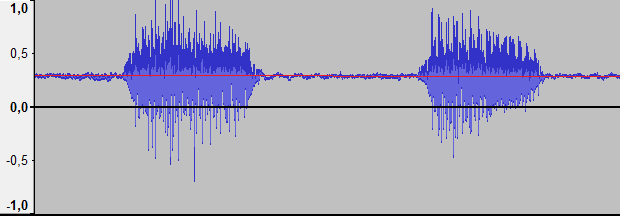
To remove the DC offset is used AudioCompressionManager.RemoveDcOffset method. See code below
static void RemoveDcOffset(string fileName)
{
DsReader dr = new DsReader(fileName);
IntPtr format = dr.ReadFormat();
byte[] data = dr.ReadData();
// Removes DC offset.
byte[] dataNew = AudioCompressionManager.RemoveDcOffset(format, data);
dr.Close();
WaveWriter ww = new WaveWriter(File.Create(fileName + ".wav"),
AudioCompressionManager.FormatBytes(format));
ww.WriteData(dataNew);
ww.Close();
}
Alvas.Audio Trial
Up
| 22. Converts Mp3 Joint Stereo to mono.
Question: Have you got any issues with "Joint-Stereo" MP3's?
I have a customer who sends me the attached MP3 and when I convert it to a mono format, it effectively cancels out the audio.
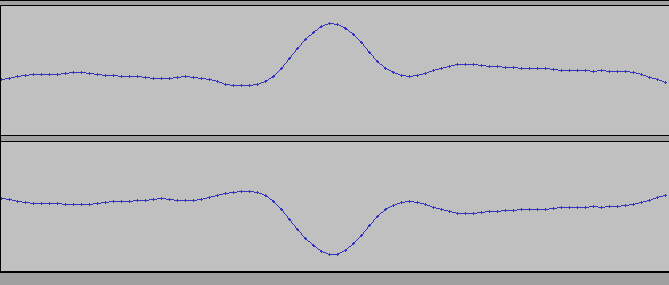
Answer: The problem is that in Mp3 Joint Stereo sound file mirror is opposite. For example the left channel = -1, and the right channel = +1.
When converting a file into single channels are merged: -1 + 1 = 0. So you hear the silence.
You can solve this problem in that way. Instead of combining the channels keep only one channel (left or right).
The code below solves this problem.
private void Mp3ToUlaw()
{
string FileName = @"d:\Work\10\SBL 6 Year 0511.mp3";
Mp3Reader mr = new Mp3Reader(File.OpenRead(FileName));
IntPtr formatMp3 = mr.ReadFormat();
IntPtr formatPcm = AudioCompressionManager.GetCompatibleFormat(formatMp3, AudioCompressionManager.PcmFormatTag);
byte[] dataMp3 = mr.ReadData();
byte[] dataPcm = AudioCompressionManager.Convert(formatMp3, formatPcm, dataMp3, false);
mr.Close();
IntPtr format8000 = AudioCompressionManager.GetPcmFormat(2, 16, 8000);
byte[] data8000 = AudioCompressionManager.Resample(formatPcm, dataPcm, format8000);
IntPtr formatMono = IntPtr.Zero;
byte[] dataLeft = null;
byte[] dataRight = null;
AudioCompressionManager.SplitStereo(format8000, data8000, ref formatMono, ref dataLeft, ref dataRight);
//mono 8bit 8Khz u-law format
IntPtr format = AudioCompressionManager.GetCompatibleFormat(formatMono, AudioCompressionManager.MuLawFormatTag);
byte[] data = AudioCompressionManager.Convert(formatMono, format, dataLeft, false);
WaveWriter ww = new WaveWriter(File.Create(FileName + ".wav"),
AudioCompressionManager.FormatBytes(format));
ww.WriteData(data);
ww.Close();
}
Up
| 23. Resampling and noise.
Very often we have to change the sampling rate, number of channels and the size of a sample when converting from one format to another. You can use AudioCompressionManager.Convert method for these purposes. Unfortunately, for the uncompressed PCM -> PCM this leads to a significant reduction in sound quality and appearance of extraneous noise. We can verify this by example.
private void Convert()
{
string fileName = @"Original.WAV";
IntPtr formatNew = AudioCompressionManager.GetPcmFormat(2, 16, 44100);
string fileNameNew = fileName + ".Convert.Wav";
for (int i = 0; i < 100; i++)
{
WaveReader wr = new WaveReader(File.OpenRead(fileName));
IntPtr format = wr.ReadFormat();
byte[] data = wr.ReadData();
wr.Close();
byte[] dataNew = AudioCompressionManager.Convert(format, formatNew, data, false);
WaveWriter ww = new WaveWriter(File.Create(fileNameNew),
AudioCompressionManager.FormatBytes(formatNew));
ww.WriteData(dataNew);
ww.Close();
fileName = fileNameNew;
//Previous format
formatNew = format;
}
}
Fortunately, Alvas.Audio library has AudioCompressionManager.Resample method. It is a wrapper over Resampler DMO object.
If we rewrite the code above using AudioCompressionManager.Resample method, we get much better sound quality.
private void Resample()
{
string fileName = @"Original.WAV";
IntPtr formatNew = AudioCompressionManager.GetPcmFormat(2, 16, 44100);
string fileNameNew = fileName + ".Resample.Wav";
for (int i = 0; i < 100; i++)
{
WaveReader wr = new WaveReader(File.OpenRead(fileName));
IntPtr format = wr.ReadFormat();
byte[] data = wr.ReadData();
wr.Close();
byte[] dataNew = AudioCompressionManager.Resample(format, data, formatNew);
WaveWriter ww = new WaveWriter(File.Create(fileNameNew),
AudioCompressionManager.FormatBytes(formatNew));
ww.WriteData(dataNew);
ww.Close();
fileName = fileNameNew;
//Previous format
formatNew = format;
}
}
You can compare the sound of these 3 files.
As a bonus AudioCompressionManager.Resample method can encode and decode the PCM 24 and 32 bit, more than 2 channels, and also 32-bit IEEE Float audio format.
Summary: For encode and decode a compressed format to PCM AudioCompressionManager.Convert fits perfectly, but for resampling use AudioCompressionManager.Resample method.
Up
| 24. Audio Readers.
- Audio Readers is a hierarchy of Alvas.Audio classes that implement IAudioReader interface used to read format and audio data.
- AudioReader is a base class for the readers that can read an audio data from the stream. This class is abstract.
- AuReader class reads an audio data from the .AU and .SND streams.
- AviReader class reads audio data from the Avi stream.
- WaveReader class reads WAVE (waveform audio format) data from the stream.
- RawReader class reads an audio data from the headerless stream. Slinear, Gsm, A-law, mu-law etc. For that, you need to specify explicitly the format of the audio data that they contain.
- Mp3Reader class reads audio data from the Mp3 stream.
- DsReader class reads audio data using DirectShow. List of supported formats can be expanded with additional DirectShow filters installed.
Use X Codec Pack
to expand the list of supported formats.
At the moment, can only work with files stored on disk.
Three methods of IAudioReader interface most commonly used.
string fileName = "Your audio file.wav";
IAudioReader ir = new WaveReader(File.OpenRead(fileName));
IntPtr format = ir.ReadFormat();// Reads an audio format.
byte[] data = ir.ReadData();// Reads all audio data from the stream.
ir.Close();// Closes the current reader and the underlying stream.
To read the audio data portions of 1 second, you can use the following code.
string fileName = "Your audio file.mp3";
IAudioReader ir = new Mp3Reader(File.OpenRead(fileName));
IntPtr format = ir.ReadFormat();// Reads an audio format.
int skipSeconds = 0;
const int readSeconds = 1;
while (true)
{
// Reads audio data starts at skipSeconds position and readSeconds duration.
byte[] data = ir.ReadData(skipSeconds, readSeconds);
if (data.Length == 0)
{
break;
}
skipSeconds += readSeconds;
}
ir.Close();// Closes the current reader and the underlying stream.
To read the audio data by portions that are smaller than 1 second, you can use the following code.
string fileName = "Your audio file.pcm";
//Specifies the format of audio data
IntPtr format = AudioCompressionManager.GetPcmFormat(2, 16, 44100);
IAudioReader ir = new RawReader(File.OpenRead(fileName), format);
const int miliseconds = 500;
int skipBytes = 0;
// Converts from milliseconds to bytes for current stream.
int readBytes = ir.Milliseconds2Bytes(miliseconds);
while (true)
{
// Reads audio data starts at skipBytes position and readBytes length.
byte[] data = ir.ReadDataInBytes(skipBytes, readBytes);
if (data.Length == 0)
{
break;
}
skipBytes += readBytes;
}
ir.Close();// Closes the current reader and the underlying stream.
The following code allows to determine the audio stream duration in milliseconds and the audio data size in bytes.
string fileName = "Your audio file.snd";
IAudioReader ir = new AuReader(File.OpenRead(fileName));
// Gets audio stream duration in milliseconds.
int durationInMS = ir.GetDurationInMS();
// Gets audio stream length in bytes.
int lengthInBytes = ir.GetLengthInBytes();
ir.Close();// Closes the current reader and the underlying stream.
Avi files are video files. They may not contain audio data. To determine this AviReader class has HasAudio property.
DsReader HasAudio equal false means that the file contains no audio data or audio file format is unknown, ie no suitable DirectShow filter.
using (AviReader ar = new AviReader(File.OpenRead("your.avi")))
{
if (ar.HasAudio)
{
// ...
}
}
using (DsReader dr = new DsReader("Your audio file"))
{
if (dr.HasAudio)
{
// ...
}
}
Enjoy.
Up
| 25. Audio and File formats.
Audio file formats can be with a header, without header and with header in each packet of audio data.
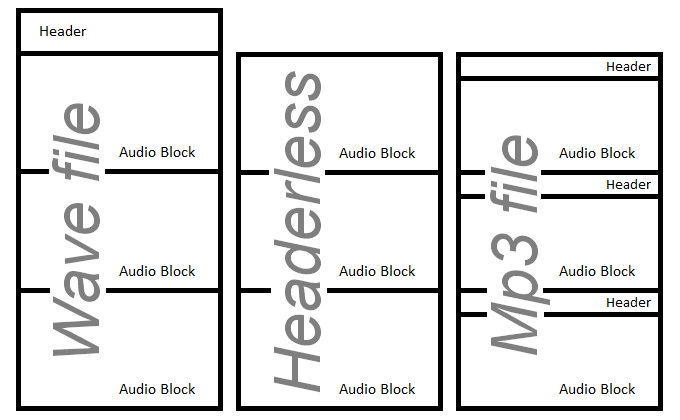
- Wav file is a classic audio format with a header. It is also called container format, because it may contain an audio data in a different format, which is specified in the header.
- Headerless(Raw audio format) audio files can contain only audio data. Therefore, we must know exactly the format of the audio data. These files usually have .raw, .sln, .pcm, .alaw, .ulaw, .gsm and other file extensions.
- MP3 format contains a header in each packet of audio data. Therefore, this format is suitable for broadcasting audio over the network.
Up
| 26. Asp.Net Audio Converter
Converts audio files with Alvas.Audio
in Asp.Net application as easy as in Windows Forms, WPF, Windows Service and Console Apps. You need
- Upload audio file.
- Select your audio file from list on the server.
- Select audio format from list with available audio formats.
- Press “Convert” button and download result audio file.
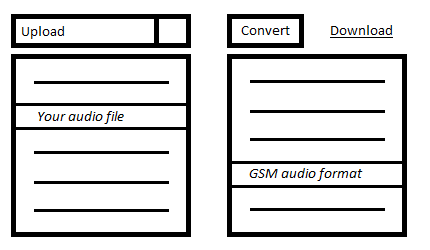
You can see online demo and
example code and
Alvas.Audio and
X Codec Pack.
Up
| 27. Alvas.Audio and WPF.
To use Windows Forms controls in Windows Presentation Foundation(WPF) applications you need:
- To create RecorderEx or PlayerEx use a constructor with a parameter isConsole = true. Example: new RecorderEx (true); or PlayerEx (true);
- Add reference to WindowsFormsIntegration assembly (in WindowsFormsIntegration.dll) to your project.
- Add reference to System.Windows.Forms assembly (in System.Windows.Forms.dll) to your project.
- In the Window element, add the following namespace mapping
xmlns:wf="clr-namespace:System.Windows.Forms;assembly=System.Windows.Forms"
in Window1.xaml. The wf namespace mapping establishes a reference to the assembly that contains the Windows Forms control.
- Place WindowsFormsHost container with our control. For example, PropertyGrid
<WindowsFormsHost Grid.Row="1" Grid.Column="0" >
<wf:PropertyGrid x:Name="pgMain"/>
</WindowsFormsHost>
- You can add control into WindowsFormsHost container in run-time:
- Place empty WindowsFormsHost container to our Window1.xaml
<WindowsFormsHost Name="wfh" Grid.Row="1" Grid.Column="1" ></WindowsFormsHost>
- and create WaveformVisualizer (from Alvas.Audio.dll) control and place it to WindowsFormsHost container in run-time
private void InitWaveformVisualizer()
{
wfv = new WaveformVisualizer();
wfh.Child = wfv;
}
private WaveformVisualizer wfv;
Full-featured examples in C# and VB.Net (WpfCs and WpfVb projects) you can see in Alvas.Audio Demos
Up
| 28. How to save audio to mp3 on Silverlight 4.
As you know Silverlight 4 supports access to the microphone. Besides it can call COM objects on the client side.
To save the audio in mp3 format we need:
- Make the COM object wrapper, which allows us to invoke the necessary Alvas.Audio functionality.
- Create AlvasCom project as ClassLibrary.
- In AssemblyInfo.cs change the line
[assembly: ComVisible(false)]
to
[assembly: ComVisible(true)]
- Add a reference to Alvas.Audio.dll
- Add Alvas.Audio-wrapper interface and its implementation. See the code below.
namespace AlvasCom
{
[Guid("50B29476-F2C0-4445-B0E1-7D4023453EBD")]
interface IAudioHost
{
void Close();
void WriteData(short channels, short bitsPerSample, int samplesPerSec, byte[] sampleData);
}
[ClassInterface(ClassInterfaceType.None)]
[Guid("1EA86BAE-420F-4309-BF06-23730718BF5E")]
public class AudioHost : IAudioHost
{
Mp3Writer mw;
public AudioHost()
{
string dir = Environment.GetFolderPath(Environment.SpecialFolder.MyMusic);
string fileName = Path.ChangeExtension(Path.GetFileName(Path.GetTempFileName()), ".mp3");
string path = Path.Combine(dir, fileName);
global::System.Windows.Forms.MessageBox.Show(path);
mw = new Mp3Writer(File.Create(path));
}
public void WriteData(short channels, short bitsPerSample, int samplesPerSec,
byte[] sampleData)
{
IntPtr sampleFormat = AudioCompressionManager.GetPcmFormat(channels, bitsPerSample,
samplesPerSec);
IntPtr format = AudioCompressionManager.GetCompatibleFormat(sampleFormat,
AudioCompressionManager.MpegLayer3FormatTag);
byte[] data = AudioCompressionManager.Convert(sampleFormat, format, sampleData, false);
mw.WriteData(data);
}
public void Close()
{
mw.Close();
}
}
}
- Sign the assembly with the snk file.
- Register in GAC AlvasCom.dll and Alvas.Audio.dll using gacutil.
- Register the COM object using regasm.
You can find AlvasCom.bat in the "SilverlightAudio\AlvasCom\bin\Debug\" folder to register these libraries.
- Make the Silverlight application with microphone support.
- Create SilverlightAudio project as SilverlightApplication.
- To call a COM object, we need elevated privileges and run it out of browser. Add to OutOfBrowserSettings.xml
  <OutOfBrowserSettings.SecuritySettings>
    <SecuritySettings ElevatedPermissions="Required" />
  </OutOfBrowserSettings.SecuritySettings>
- Writing code call using the "dynamic" type
namespace SilverlightAudio
{
public class MyAudioSync : AudioSink
{
dynamic ah;
AudioFormat audioFormat;
protected override void OnCaptureStarted()
{
ah = AutomationFactory.CreateObject("AlvasCom.AudioHost");
}
protected override void OnCaptureStopped()
{
ah.Close();
}
protected override void OnFormatChange(AudioFormat audioFormat)
{
this.audioFormat = audioFormat;
}
protected override void OnSamples(long sampleTime, long sampleDuration, byte[] sampleData)
{
ah.WriteData((short)audioFormat.Channels, (short)audioFormat.BitsPerSample,
audioFormat.SamplesPerSecond, sampleData);
}
}
}
- Compile and run the application.
- Enjoy.
The source code and precompiled examples are here. (SilverlightAudio.zip)
How can we extend this example? Come immediately to mind
- Save mp3 file on the server.
- Make voice chat, but it is better to use gsm instead of mp3 encoding. How to do it - leave it in the form of homework. Hint #tip60 :)
- And what can you propose?
P.S. If you have any problems - please write us.
Up
| 29. ID3 tags for Wave files.
ID3 (Identify a MP3) is metadata container most often used for MP3 audio files. ID3 signature contains information about the title track, album, artist name, etc. about the file to be stored in the file itself. Please see ID3.
Wave files can also store metadata similar ID3.
The code below shows how to add, delete, and read metadata from the Wav files.
private void WaveTag()
{
string fileName = "in.wav";
WaveReadWriter wrw = new WaveReadWriter(File.Open(fileName, FileMode.Open, FileAccess.ReadWrite));
//removes INFO tags from audio stream
wrw.WriteInfoTag(null);
//writes INFO tags into audio stream
Dictionary<WaveInfo, string> tag = new Dictionary<WaveInfo, string>();
tag[WaveInfo.Comments] = "Comments...";
wrw.WriteInfoTag(tag);
wrw.Close();
//reads INFO tags from audio stream
WaveReader wr = new WaveReader(File.OpenRead(fileName));
Dictionary<WaveInfo, string> dir = wr.ReadInfoTag();
wr.Close();
if (dir.Count > 0)
{
foreach (string val in dir.Values)
{
Console.WriteLine(val);
}
}
}
In addition, we show how to do the same for mp3 files with ID3 Tag V1.0
private void Mp3Tag()
{
string fileName = "in.mp3";
Mp3ReadWriter mrw = new Mp3ReadWriter(File.Open(fileName, FileMode.Open, FileAccess.ReadWrite));
//removes ID3v1 tags from audio stream
mrw.WriteID3v1Tag(null);
//writes ID3v1 tags into audio stream
ID3v1 tag = new ID3v1();
tag.Comment = "Comment...";
mrw.WriteID3v1Tag(tag);
mrw.Close();
//reads ID3v1 tags from audio stream
Mp3Reader mr = new Mp3Reader(File.OpenRead(fileName));
ID3v1 id3v1 = mr.ReadID3v1Tag();
mr.Close();
if (id3v1 != null)
{
Console.WriteLine(id3v1.Comment);
}
}
Up
| 30. What is ACM driver?
Audio Compression Manager (ACM) is the Windows multimedia framework that manages audio codecs. Codec is a computer program that compresses/decompresses digital audio data according to a given audio file format or streaming audio format.
ACM driver is dynamic-link library (DLL) which contains audio codecs for different audio formats.
ACM drivers can be recognized by their filename extension ".acm". For more details please see Audio Compression Manager
The code below can be used to list ACM codecs installed on your computer and see audio formats for specified codec.
private void WhatIsAcmDriver()
{
foreach (DriverDetails dd in AudioCompressionManager.GetDriverList())
{
Console.WriteLine("# # #");
Console.WriteLine("Driver: {0}", dd.LongName);
foreach (FormatTagDetails ftd in AudioCompressionManager.GetFormatTagList(dd.Driver))
{
Console.WriteLine("FormatTag: {0}", ftd.FormatTagName);
foreach (FormatDetails fd in AudioCompressionManager.GetFormatList(ftd.FormatTag, dd.Driver))
{
Console.WriteLine("Format: {0}", fd.FormatName);
}
}
}
}
Output for "Microsoft GSM 6.10 Audio CODEC" (for example) driver see below
# # #
Driver: Microsoft GSM 6.10 Audio CODEC
FormatTag: GSM 6.10
Format: 8,000 kHz; Mono
Format: 11,025 kHz; Mono
Format: 22,050 kHz; Mono
Format: 44,100 kHz; Mono
FormatTag: PCM
Format: 8,000 kHz; 8 Bit; Mono
Format: 8,000 kHz; 16 Bit; Mono
Format: 11,025 kHz; 8 Bit; Mono
Format: 11,025 kHz; 16 Bit; Mono
Format: 22,050 kHz; 8 Bit; Mono
Format: 22,050 kHz; 16 Bit; Mono
Format: 44,100 kHz; 8 Bit; Mono
Format: 44,100 kHz; 16 Bit; Mono
# # #
Up
| 31. How can be one audio file mixed to another?
Question: I have multiple audio tracks with nothing but music.
I have multiple recorded voice tracks no longer than 2-3 seconds each.
What I would like to do is 'overlay' a voice track onto an audio
track at a specified time and output the results to a single file.
E.g. Audio track is 2 minutes long, and I would like to insert
the voice track at 23 seconds as well 1m 05 seconds and at 1m 40 seconds.
Can Alvas.Audio accomplish this sort of task for me??
Answer: See the code below
Imports System.IO
Imports Alvas.Audio
Public Class Form1
Private Sub Button1_Click(ByVal sender As System.Object, ByVal e As System.EventArgs) Handles Button1.Click
MixMany("c:\audio\files\")
End Sub
Private Shared Sub Debug(ByVal name As String, ByVal wf As WaveFormat)
Dim format As String = "Variable: [{0}], FormatTag: {1}, Channels: {2}, SamplesPerSec: {3}, BitsPerSample: {4}, BlockAlign: {5}, AvgBytesPerSec: {6}"
Console.WriteLine(format, name, wf.wFormatTag, wf.nChannels, wf.nSamplesPerSec, wf.wBitsPerSample, wf.nBlockAlign, wf.nAvgBytesPerSec)
End Sub
Private Shared Sub MixMany(ByVal dir As String)
Dim format1 As IntPtr
Dim data1 As Byte()
ReadData(dir + "The Friendship Song.mp3", format1, data1)
Dim format2 As IntPtr
Dim data2 As Byte()
ReadData(dir + "Kailin 1.mp3", format2, data2)
Dim wf1 As WaveFormat = AudioCompressionManager.GetWaveFormat(format1)
Debug("wf1", wf1)
Dim wf2 As WaveFormat = AudioCompressionManager.GetWaveFormat(format2)
Debug("wf1", wf2)
If Not wf1.Equals(wf2) Then
data2 = AudioCompressionManager.Convert(format2, format1, data2, False)
End If
Dim data As Byte() = AudioCompressionManager.MixMany(format1, data1, data2, wf1.nSamplesPerSec * 27.1, wf1.nSamplesPerSec * 83.28)
Dim formatMp3 As IntPtr = AudioCompressionManager.GetCompatibleFormat(format1, AudioCompressionManager.MpegLayer3FormatTag)
Debug("wfMp3", AudioCompressionManager.GetWaveFormat(formatMp3))
Dim dataMp3 As Byte() = AudioCompressionManager.Convert(format1, formatMp3, data, False)
Dim mw As New Mp3Writer(File.Create(dir + "Test002.mp3"))
mw.WriteData(dataMp3)
mw.Close()
MsgBox("Done!")
End Sub
Private Shared Sub ReadData(ByVal fileName As String, ByRef format1 As IntPtr, ByRef data1 As Byte())
Dim dr1 As New Mp3Reader(File.OpenRead(fileName))
format1 = dr1.ReadFormat()
data1 = dr1.ReadData()
dr1.Close()
Dim format1Pcm As IntPtr = AudioCompressionManager.GetCompatibleFormat(format1, AudioCompressionManager.PcmFormatTag)
Dim data1Pcm() As Byte = AudioCompressionManager.Convert(format1, format1Pcm, data1, False)
format1 = format1Pcm
data1 = data1Pcm
End Sub
End Class
Up
| 32. What is compressed audio format?
Audio compression is a kind of data compression developed to reduce the transmission bandwidth of digital sound streams
and the size of audio files. Audio compression algorithms are applied in computer software as audio codecs. The compromise
between a little reduced sound quality and transmission or size is outweighed by the last for most practical audio apps in which
users may not feel the loss in playback rendition quality.
For instance, one compact disk (CD) contains about one hour of uncompressed ( PCM) high quality music,
less than 2 hours of music compressed without loss in playback, or 7 hours of music compressed in the MP3 format at medium bit rates.
Lets analyse compressed audio format, for instance, "GSM 6.10". This format is applied to compress the mobile operators speaking on cellular.
GSM is applied for over 3 billion people in more than 212 countries and territories.
AudioCompressionManager.GetWaveFormat can analyse the audio format inside.
- FormatTag = 49 is "GSM 6.10" format.
- Channels = 1 is single-channel.
- SamplesPerSec = quantity of digitized values per second (or sampling): 8000 Hz, 11025 Hz, 22050 Hz, 44100 Hz.
- BitsPerSample = 0, unimportant for this format.
- BlockAlign = 65. The size of the compressed block (in bytes).
- AvgBytesPerSec is byterate(Bitrate equal byterate * 8) = 1625. For "GSM 6.10 22050 Hz; Mono".
You can use the code below to look through "GSM 6.10" audio format in more detail.
private void WhatIsCompressedAudioFormat()
{
foreach (FormatDetails fd in AudioCompressionManager.GetFormatList(AudioCompressionManager.Gsm610FormatTag, true))
{
WaveFormat wf = AudioCompressionManager.GetWaveFormat(fd.FormatHandle); string format = "Format: [{0}], FormatTag: {1}, Channels: {2}, SamplesPerSec: {3}, BitsPerSample: {4}, BlockAlign: {5}, AvgBytesPerSec: {6}"; Console.WriteLine(format, fd, wf.wFormatTag, wf.nChannels, wf.nSamplesPerSec, wf.wBitsPerSample, wf.nBlockAlign, wf.nAvgBytesPerSec);
}
}
Up
| 33. What is a PCM format?
PCM (Pulse-code modulation) is an uncompressed audio format.
We get the Wav file, that maintains (holds) the PCM data.
See how to do What is a Wav-file?
Method AudioCompressionManager.GetWaveFormat helps investigate the audio format.
- FormatTag = 1 is PCM.
- Channels = for single-channel (mono), two-channel (stereo), 8 for 7.1 Surround Sound (left, right, center, left surround,
right surround, left rear, right rear positions. 7.1 systems also have 1 channel for low frequency effects (LFE) which is usually sent to a subwoofer).
- SamplesPerSec = digitized quantity values per second (or sampling). Could be anything, but the standard values: 8000 Hz, 11025 Hz,
12000 Hz, 16000 Hz, 22050 Hz, 24000 Hz, 32000 Hz, 44100 Hz, 48000 Hz.
- BitsPerSample - most common uses 8 bits (1 byte) and 16 bits (2 bytes). Rarely 24 bits (3 bytes), 32 bits (4 bytes) and 64 bits (4 bytes).
If we consider the 16 bit as a basic, then 8 bits can be considered as a compressed format. It has two times less size,
but the variants of values can be only 28 = 256 instead of 216 = 65536 for 16 bits. That's why, 8 bits sound quality will be
significantly lower than 16 bits.
- BlockAlign = Channels * BitsPerSample / 8. Where 8 is the quantity of bits per byte.
- AvgBytesPerSec (bitrate) = Channels * SamplesPerSec * BitsPerSample / 8.
You can use the code below to analyze PCM audio format in more particularly.
private void WhatIsPcmFormat(string fileName) { WaveReader wr = new WaveReader(File.OpenRead(fileName)); IntPtr format = wr.ReadFormat(); wr.Close(); WaveFormat wf = AudioCompressionManager.GetWaveFormat(format); if (wf.wFormatTag == AudioCompressionManager.PcmFormatTag) { int bitsPerByte = 8; Console.WriteLine("Channels: {0}, SamplesPerSec: {1}, BitsPerSample: {2}, BlockAlignIsEqual: {3}, BytesPerSecIsEqual: {4}", wf.nChannels, wf.nSamplesPerSec, wf.wBitsPerSample, (wf.nChannels * wf.wBitsPerSample) / bitsPerByte == wf.nBlockAlign, (int)(wf.nChannels * wf.nSamplesPerSec * wf.wBitsPerSample) / bitsPerByte == wf.nAvgBytesPerSec); } }
Up
| 34. What is a Wav-file?
WAVE (WAV) is a container format for recording the digitized audio stream. Under Windows, this format is often
applied as a wrapper for uncompressed audio (PCM). But, you can put sound in WAV container compressed perhaps in any codec. In that way your WAV-file can maintain data in various audio formats, such as the CCITT A-Law, CCITT u-Law, ADPCM, Speex, GSM 6.10, MPEG Layer-3 (mp3), Ogg Vorbis and others.
You can use the code below to investigate audio-format data recorded in your WAV-file.
private void WhatIsWavFile(string fileName) { WaveReader wr = new WaveReader(File.OpenRead(fileName)); IntPtr format = wr.ReadFormat(); wr.Close(); WaveFormat wf = AudioCompressionManager.GetWaveFormat(format); string tag = null; switch (wf.wFormatTag) { case AudioCompressionManager.PcmFormatTag : tag = "PCM"; break; case AudioCompressionManager.ALawFormatTag : tag = "A-Law"; break; case AudioCompressionManager.MuLawFormatTag : tag = "Mu-Law"; break; case AudioCompressionManager.Gsm610FormatTag : tag = "GSM 6.10"; break; case AudioCompressionManager.ImaAdpcmFormatTag : tag = "IMA ADPCM"; break; case AudioCompressionManager.AdpcmFormatTag : tag = "Microsoft ADPCM"; break; case AudioCompressionManager.MpegLayer3FormatTag : tag = "ISO/MPEG Layer3"; break; default: tag = wf.wFormatTag.ToString(); break; } Console.WriteLine("File '{0}' contains '{1}' data", fileName, tag); }
Up
| | |
|
|
|